How your organisation works, in numbers.
Dazr Analytics turns the work in your Dazr apps into dashboards: customer service in Desk, hours in Time, issues in Projects, meetings in Calendar, the shared inboxes in Mail and the sign-ins of your organisation. Counts and durations only, and team totals by default.
Part of Dazr Enterprise, for owners, admins and the colleagues they choose.
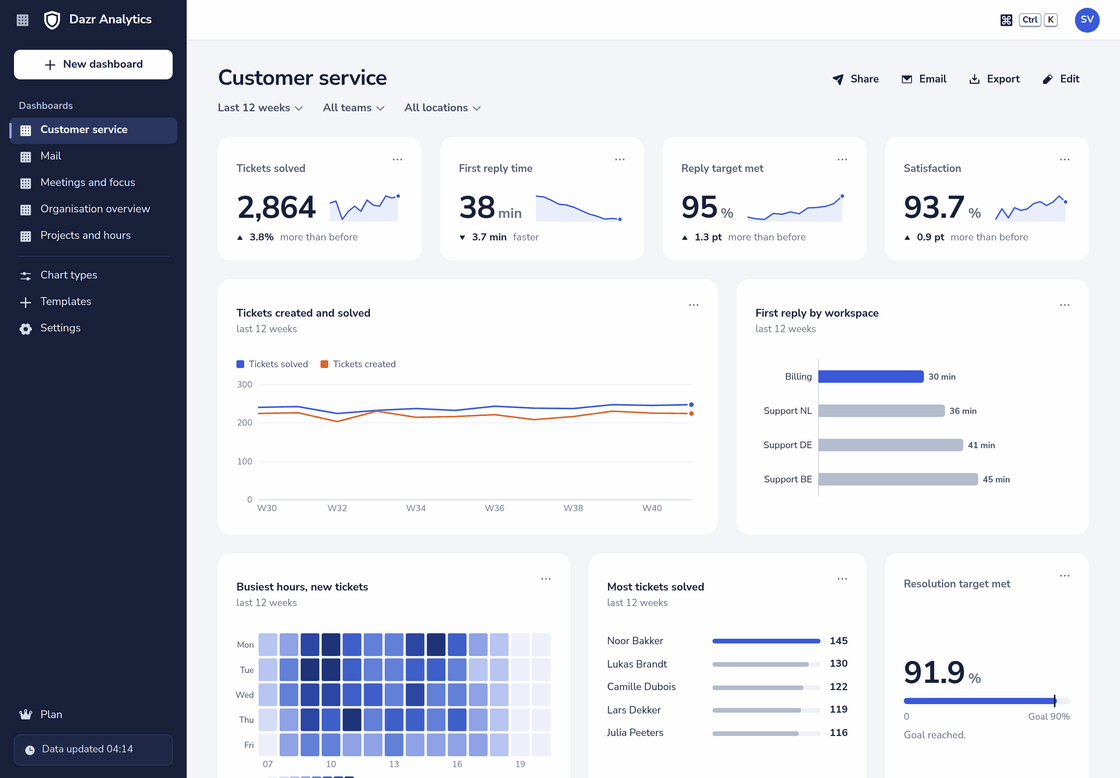
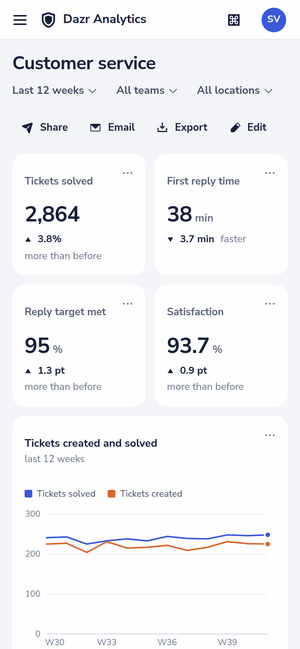
The Customer service dashboard of a company with four helpdesk workspaces, over the last 12 weeks. On the right, the same dashboard on a phone.
The questions it answers.
Over 70 metrics from the apps your company already works in, each one split by team, period or what fits it.
Tickets created and solved, first reply and resolution times, reply targets met and satisfaction, per helpdesk workspace, priority or agent.
Hours logged per project, client and team, billable and not, and the logged hours of done issues against their estimate.
Meeting time and focus time per person per week, by team, with the weekdays and hours when meetings happen.
Mail received and sent per shared inbox, new conversations, response time and the busiest hours of the week.
Sign-ins, blocked attempts by country, people without a passkey and accounts nobody signed in to for 30 days.
Members, active users, seats used, storage by team, files shared outside the organisation and documents sent for signature.
Six dashboards, ready on day one.
Pick one and it fills with your organisation’s own numbers right away. Change, move and add charts after.
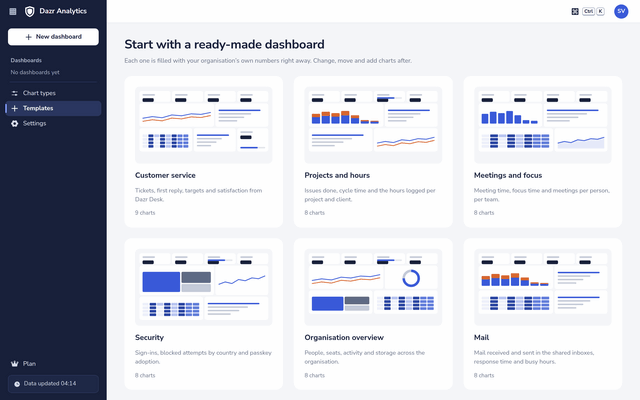
Tickets, first reply, targets and satisfaction from Dazr Desk, with the busiest hours and who solved the most.
Issues done, cycle time and the hours logged per project and client, with the billable share against your goal.
Meeting time, focus time and meetings per person per week, per team, from Dazr Calendar.
Sign-ins, blocked attempts on a map, passkey adoption per team and accounts that went quiet.
People, roles, seats, active users and storage, and how many people still sign in months after joining.
Mail received and sent in the shared inboxes, response time per inbox and the busiest hours.
Build a chart by answering questions.
No query language and no formulas. The builder asks one thing at a time and shows your own numbers as you go.
One sentence, every choice in it
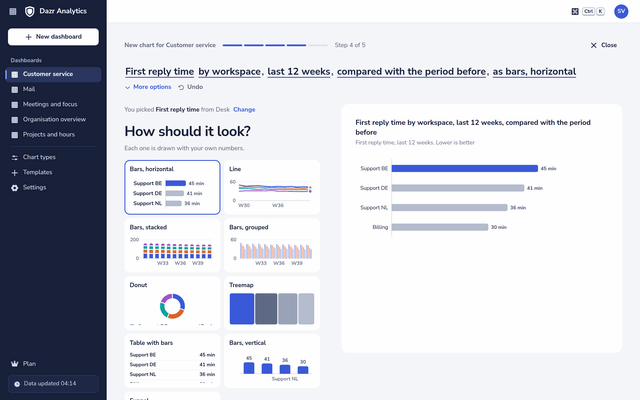
What do you want to see, split by what, over which period, and how should it look? Your answers form one sentence, such as “First reply time by workspace, last 12 weeks, compared with the period before, as bars”. Click any part of it to change it.
- Compare with the period before, the same period a year earlier, or a target you set.
- Filter on a workspace, project, client, team or location, and show only the top 3, 5, 10 or 20.
- Turn totals into hours per person per week, or one metric against another, such as logged against estimated hours.
- For analysts, a pivot table with rows and columns of your choice.
19 chart types and a pivot table
Lines, areas, bars side by side or stacked, a number with its trend, progress to a target, donuts, heatmaps by weekday and hour, tables with bars, funnels, scatter plots, treemaps, a map, a timeline, a leaderboard and cohorts. Each is drawn with your own numbers before you choose it.
One colour for what matters, grey for the rest, so a dashboard reads at a glance.
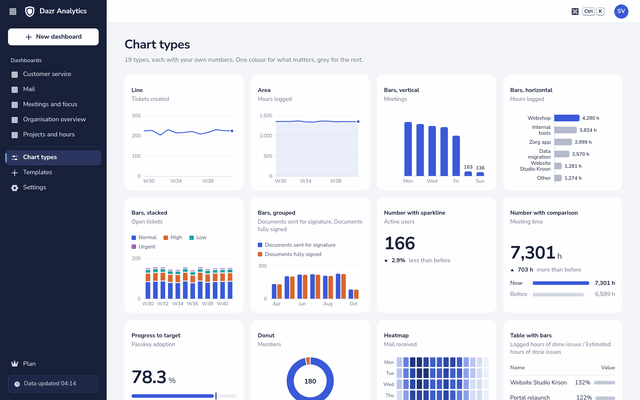
Up to 40 charts on a dashboard. Drag them into place and resize them, or move them with the keyboard.
The period, the team and the location at the top of a dashboard apply to every chart on it.
The last 7 or 30 days, 12 weeks, 3, 6 or 12 months, this month, quarter or year, or dates you choose, up to 25 months back.
Share it, or get it by email.
The numbers go to the people who act on them, without anyone copying charts into a slide.
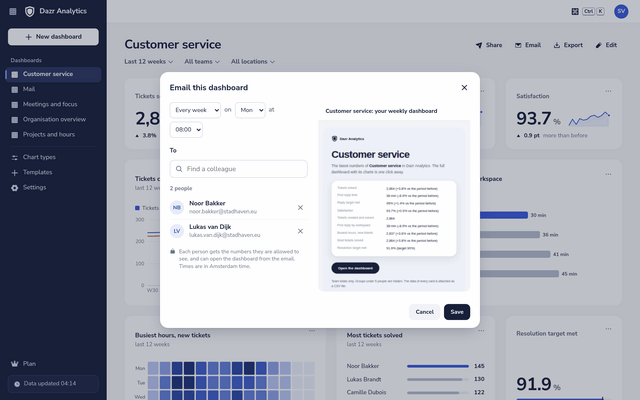
A weekly or monthly email
Send a dashboard every week on the day you choose, or every month, at the hour you pick. Each colleague gets their own email with the headline number of every chart they are allowed to see, a link to the dashboard and the data as a CSV file.
- Share a dashboard with colleagues in your organisation to view or to edit.
- Download a dashboard as an image or a PDF, and the data of a dashboard or a single chart as CSV.
- Your dashboards stay yours: owners and admins only see the ones you share with them.
Private by design.
Analytics is about how teams work, not about watching people.
Analytics keeps how many and how long. It never reads the text of a message, a subject, a meeting title, a note or a file name. Personal mailboxes, direct chats and group chats are never counted.
Analytics never shows a number for a group of fewer than 5 people. In a chart per team, location or role, smaller groups are added together into one bar. Filter on a team of 3 and the chart says why it stays empty. It also stops the trick of taking one total away from another to find a small group.
Numbers are about teams. Per person appears in three places only: hours logged, Desk agents and security. Only owners, admins and read-only admins see those.
Owners and admins give the Analytics viewer permission to the colleagues who need it. A viewer sees team totals and no security numbers. A dashboard shared with someone shows them only what they may see themselves.
Encrypted and stored in the EU. The daily numbers are deleted by themselves after 25 months. How Dazr Analytics protects your people
What it counts, app by app.
What each Dazr app gives to Analytics, and what stays out.
| App | What Analytics counts | What stays out |
|---|---|---|
| Desk | Tickets created and solved, reply and resolution times, targets met, satisfaction, open and overdue tickets, time on tickets | The text of customer mail and replies |
| Mail received and sent in the shared inboxes, new conversations, response time | Personal mailboxes, subjects and text | |
| Projects and Time | Issues created and done, cycle and lead time, open, overdue and blocked issues, story points, hours logged, billable hours | Issue titles, descriptions and time notes |
| Calendar | Meetings with at least one other person, meeting time, focus time, meetings with people outside, bookings, out of office | Titles, places and notes |
| Teams | Messages and replies in the organisation’s channels, active people per channel, video notes, meetings planned | Direct chats, group chats and message text |
| Files, Docs, Sheets and Slides | Storage used, files added, share links made, files shared outside, documents edited by several people | File names and contents |
| Sign | Documents sent, fully signed and declined, time to sign | The documents themselves |
| Security and organisation | Sign-ins, blocked attempts by country, passkey adoption, members, roles, seats and active users | Passwords and passkeys |
A closer look, by team.
What Analytics shows for the teams that ask most often.
Response and resolution times in Dazr Desk, targets met and satisfaction, per workspace and priority, with the shared inboxes of Dazr Mail next to them.
Hours per project, client and team from Dazr Time, issues done and cycle time from Dazr Projects, and logged against estimated hours.
What Analytics keeps, what it never reads, who sees what and how the 5-person rule works, to share with your people.
Part of Dazr Enterprise.
Dazr Analytics is included in Dazr Enterprise, with nothing to install and no separate price.
Owners, admins and read-only admins of your organisation, the colleagues they give the Analytics viewer permission, and anyone a dashboard is shared with.
On the first opening, Analytics counts back up to 90 days wherever an app keeps that history, and from then on it updates during the day.
Analytics is only in Enterprise. On Pro, Dazr Desk keeps its own reports of tickets and reply times.
Questions, answered.
Which plan includes Dazr Analytics?
Dazr Enterprise. Analytics is not part of the other plans. See pricing
Can a manager see what one person did?
Not in general. Numbers are team totals, and groups of fewer than 5 people are never shown on their own. Per person appears only for hours logged, Desk agents and security, and only owners, admins and read-only admins see it.
Does Analytics read our mail or chats?
No. It counts mail in the shared inboxes and messages in the organisation’s channels, with their times. It never reads text, subjects or file names, and never counts personal mailboxes, direct chats or group chats.
How up to date are the numbers?
Analytics updates during the day, and each dashboard says when its data was last updated.
Can we take the numbers elsewhere?
Yes. Download a dashboard as an image or a PDF, and the data of a dashboard or any chart as CSV. The scheduled email has the CSV attached.
Do I need to install anything?
No. Analytics runs in the browser on your computer and your phone, at suite.dazr.eu/analytics.
See how your organisation works.
Dazr Analytics is part of Dazr Enterprise.
Customer service dashboardTeam hours and project reportsPrivacyQuestions? Contact us