A customer service dashboard that fills itself.
Dazr Analytics reads the tickets of Dazr Desk and the shared inboxes of Dazr Mail, and shows how fast your team answers, which targets it meets and how customers rate it. Per workspace, priority and week, without a spreadsheet.
Dazr Analytics is part of Dazr Enterprise, with Dazr Desk and Dazr Mail.
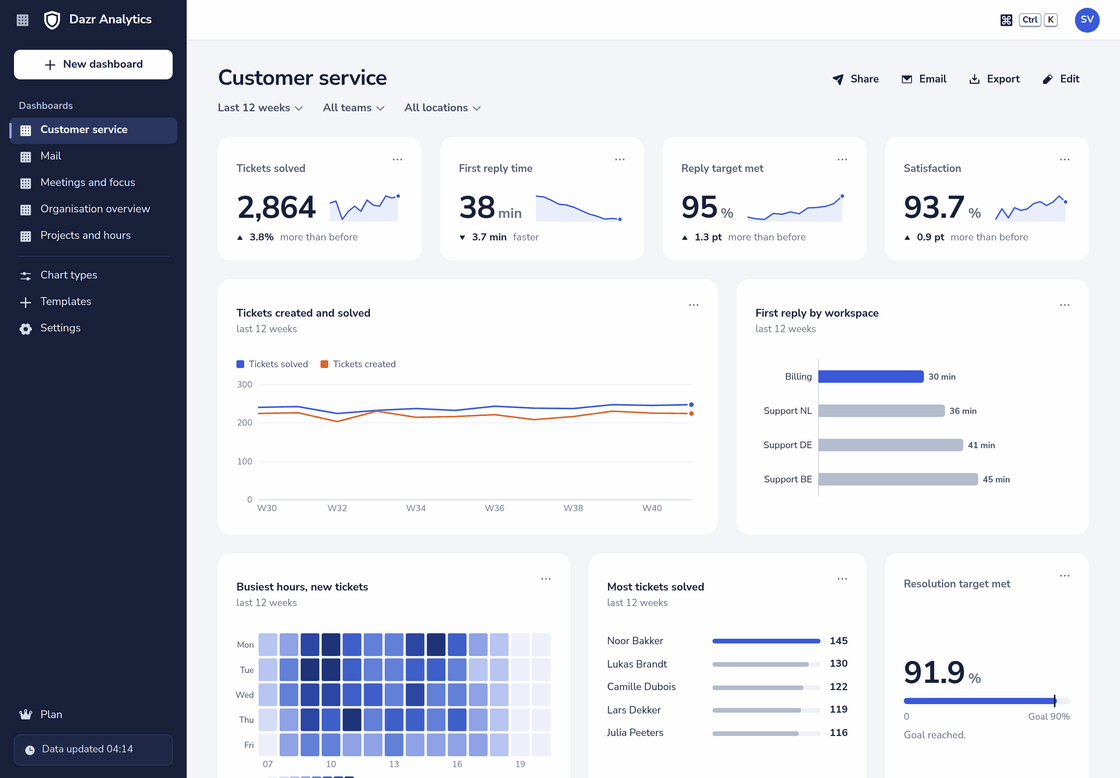
The ready-made Customer service dashboard of a company with four helpdesk workspaces, over the last 12 weeks.
The numbers support leads ask for.
Each one from the tickets your team already works in, split the way you need it.
| Metric | What it tells you |
|---|---|
| Tickets created and solved | Whether the team keeps up, per workspace, type, priority, tag and how the ticket came in |
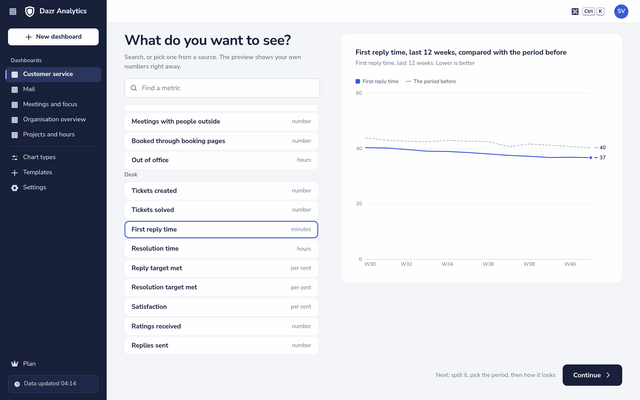
| First reply time | How long customers wait for a first answer, on average |
| Resolution time | How long it takes to solve a ticket |
| Reply and resolution targets met | The share of tickets that met the reply targets you set in Dazr Desk |
| Satisfaction | The share of Good ratings customers gave after a ticket was solved, and how many ratings came in |
| Open tickets and tickets past their target | The backlog on each day, per workspace, priority and status |
| Replies sent | How much the team answers, by weekday and hour |
| Time on tickets | The hours logged on tickets in Dazr Time, billable or not |
Response times, in context.
A number alone says little. Analytics puts it next to the period before, last year or your goal.
Better or worse, at a glance
Every chart can compare with the period just before, the same period a year earlier or a target. Analytics knows that a shorter reply time is good news and a longer backlog is not, and says so in words next to the arrow.
- First reply time per workspace, fastest first.
- Resolution target met against a goal of 90 per cent.
- New tickets as a heatmap by weekday and hour, to plan who is on when.
- Satisfaction per priority, to see where the hard tickets go wrong.
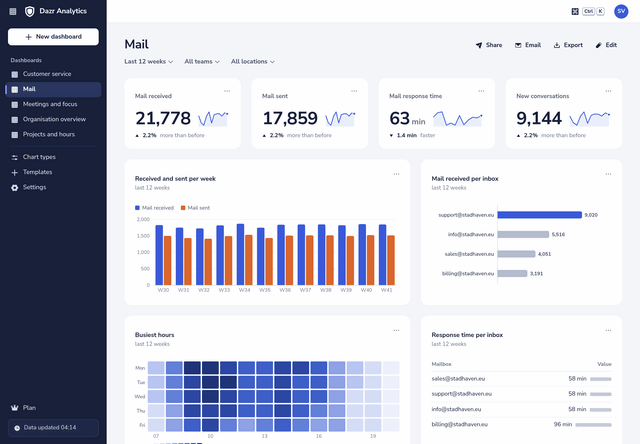
The shared inboxes, next to the tickets.
Not every customer email is a ticket. Sales, info and billing addresses get their own numbers.
Mail response time per inbox
The ready-made Mail dashboard counts the mail received and sent in each shared inbox of Dazr Mail, the new conversations and how long a reply takes. Personal mailboxes are never counted, and no subject or text is read.
Put a chart of your sales inbox on the Customer service dashboard, and the whole front door of your company is on one screen.
Agents, fairly.
A helpdesk is teamwork. The dashboard is built that way.
Colleagues with the Analytics viewer permission, and those a dashboard is shared with, see the numbers per workspace and team, not per agent.
Desk agents are one of the three places with numbers per person. Only owners, admins and read-only admins of your organisation see them, to spread the work, not to race.
A team of fewer than 5 people never shows on its own. Its numbers are added together with the other small teams, or left out, so a support desk of three cannot be singled out.
The Monday numbers, sent for you.
Plan the email once and the team lead starts the week with it.
Pick the weekday or the day of the month and the hour. Each colleague gets the headline numbers they may see, with a link to the dashboard.
The email carries the numbers of every chart as a CSV file, ready for a sheet in Dazr Sheets.
Share the dashboard to view or to edit. The filter bar for period, team and location works for everyone.
Desk reports or Analytics?
Both come with Enterprise. They answer different questions.
| Reports in Dazr Desk | Dazr Analytics | |
|---|---|---|
| Plans | Pro and Enterprise | Enterprise |
| For | Agents and admins of a workspace | Owners and admins of the organisation, and the colleagues they choose |
| Period | Open tickets and the last 90 days | Up to 25 months, with the period before or a year earlier next to it |
| What else | The ratings with their comments, and on Enterprise a timesheet per agent | Shared inboxes, hours, projects and the rest of your organisation on the same dashboard |
| Sharing | Every table as CSV | Dashboards to share, a scheduled email, image, PDF and CSV |
Questions, answered.
Do we need to set anything up?
No. Open Dazr Analytics and pick Customer service: the dashboard fills with the tickets of every helpdesk workspace in your organisation. Teams and locations, set in the Analytics settings, add more ways to split.
Where do the reply targets come from?
From Dazr Desk. Analytics shows the share of tickets that met the reply and resolution targets you set per workspace and priority.
Does Analytics read the customer’s email?
No. It counts tickets, replies and their times. The text of a ticket, a reply or a mail never goes into Analytics.
Which plan do we need?
Dazr Enterprise, which includes Dazr Desk, Dazr Mail and Dazr Analytics. See pricing
Know how fast you answer.
Dazr Analytics is part of Dazr Enterprise.