Where the hours go, per project and client.
Your teams log time in Dazr Time and plan the work in Dazr Projects. Dazr Analytics adds it up: hours per project, client and team, the billable share against your goal, and how fast issues move from start to done.
Dazr Analytics and Dazr Time are part of Dazr Enterprise.
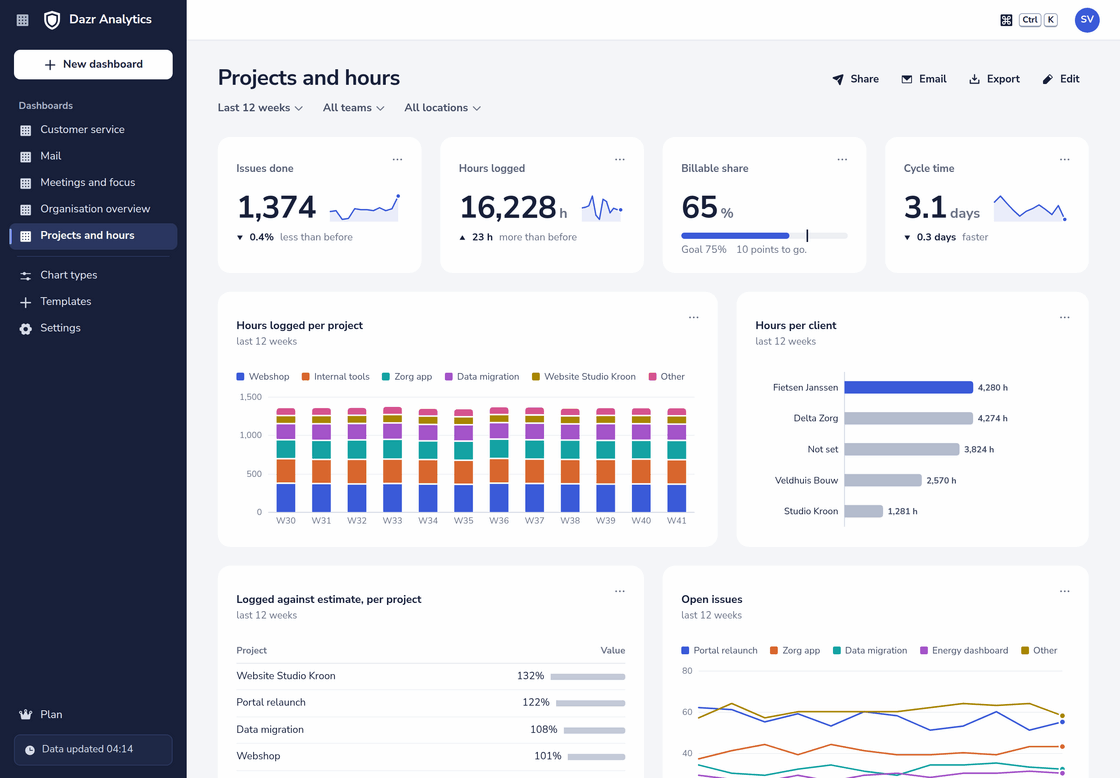
The ready-made Projects and hours dashboard, over the last 12 weeks: hours per project and client, and logged against estimated hours.
Hours, added up.
Every hour logged in Dazr Time, on an issue in Dazr Projects or a ticket in Dazr Desk, counts.
Hours logged per project, client and helpdesk workspace, by week or month, with the five biggest on top and the rest as Other.
Billable hours, non-billable hours and the billable share, with a goal of your own to measure it against.
The hours of each team and office, and the hours per person per week for a fair comparison between teams of different sizes.
How many people log time per project, and how many entries they make, to see whether the timesheets are complete.
Which days the hours land on, per project or client.
Compare this quarter with the same quarter a year earlier, or with the quarter before.
How the work moves.
From the issues of Dazr Projects, without filling in a status report.
| Metric | What it tells you |
|---|---|
| Issues created and done | Whether the work coming in matches the work going out, per project, type and priority |
| Cycle time and lead time | How many days an issue takes from started to done, and from created to done |
| Open, overdue and blocked issues | The work still on the board, what passed its due date and what is waiting on something else |
| Story points and sprint progress | How many story points a team finishes, and how far the current sprint is |
| Logged against estimated hours | For done issues, the hours logged as a share of the original estimate, per project |
Your own report in four steps.
The ready-made dashboard is a start. The builder makes the chart your controller or client asks for.
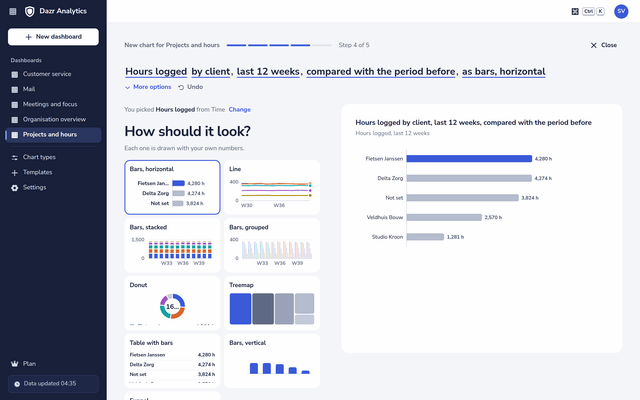
Hours logged by client, as bars
Pick Hours logged, split it by client, choose the period and how it looks. The preview uses your own numbers from the first click, and the sentence at the top lets you change any choice afterwards.
- Filter on billable hours only, or on one project.
- Show hours per person per week instead of the total.
- Put two metrics side by side, such as billable and non-billable hours.
- A pivot of projects against months, for the finance team.
Hours per person, with care.
Hours logged are one of the three places where Analytics can show a person.
Hours per person are for the owners, admins and read-only admins of your organisation. Analytics viewers and shared dashboards show team totals.
The lead of a project sees the hours logged there in the timesheets of Dazr Time, per person, as they always did.
Split by team or location, a group of fewer than 5 people is never shown on its own.
From dashboard to invoice.
Analytics shows the trend; the timesheets keep the detail.
Download the numbers of a chart or a whole dashboard as CSV and open them in Dazr Sheets.
Send the dashboard on the first of the month to the people who invoice, with the data attached.
For the invoice itself, the timesheets of Dazr Time download every entry with the client, project, hours and whether it is billable.
Questions, answered.
Where do the hours come from?
From Dazr Time: the hours your people log on issues in Dazr Projects and on tickets in Dazr Desk, including meetings logged from Dazr Calendar.
What is the difference with the timesheets?
The timesheets of Dazr Time list every entry, for checking and invoicing. Analytics shows totals and trends over up to 25 months, next to the work in Projects and Desk.
Can I see the hours of one person?
Owners, admins and read-only admins can. Everyone else in Analytics sees team totals.
Which plan do we need?
Dazr Enterprise, which includes Dazr Projects, Dazr Desk, Dazr Time and Dazr Analytics. See pricing
See where the time goes.
Dazr Analytics is part of Dazr Enterprise.